

M.2 NVMe SSD enclosure adapter, totally tool-free. USB C 3.1 Gen 2 10Gbps to NVMe PCIe M-Key(B+M Key) Solid State Drive External Enclosure. It supports UASP Trim for M.2 NVMe SSD Size 2242/2260/2280.
Detail
SuperSpeed USB+:
Adopts USB 3.1 Gen 2 that M.2 Enclosure up to 10 Gbps, capable of performance over 900MB/s read/write when using high-performance SSD. The perfect solution for data transfer and data backup, the actual transfer speed depends on the speed of USB Port type, your computer performance, etc. Backward compatible with USB 3.1 Gen1 up to 5Gbps.
Compatibility:
Compatible with M.2 NVMe PCIe M Key & B+M Key SSD up to 2TB, applicable to sizes 2242/2260/2280 SSDs. Not compatible with M.2 SATA SSDs, M.2 PCIe AHCI SSDs, M.2 PCIe devices such as WiFi and capture cards, mSATA SSDs, and non-M.2 form factor SSDs. Note: M.2 NVMe SSD is not included;
Supports Windows, Mac OS, Linux, Android.
How to Use:
1. Press the lock button on the product.
2. Pull out the PCBA board.
3. Insert the M.2 SSD diagonally down to the PCIe / NVMe slot.
4. Remove the silicone pad and heat sink from the package.
5. Paste the silicone pad accessories on the M.2 SSD card below.
6. Paste the heat sink accessories on the silicone pad below.
7. Gently press down on the M.2 SSD with your fingers and snap it into the plastic snap-on case. 8. When disassembling, also push the buckle outward to release it.
Notes:
Specification:
M.2 NVMe SSD enclosure adapter, totally tool-free. USB C 3.1 Gen 2 10Gbps to NVMe PCIe M-Key(B+M Key) Solid State Drive External Enclosure. It supports UASP Trim for M.2 NVMe SSD Size 2242/2260/2280.
Detail
SuperSpeed USB+:
Adopts USB 3.1 Gen 2 that M.2 Enclosure up to 10 Gbps, capable of performance over 900MB/s read/write when using high-performance SSD. The perfect solution for data transfer and data backup, the actual transfer speed depends on the speed of USB Port type, your computer performance, etc. Backward compatible with USB 3.1 Gen1 up to 5Gbps.
Compatibility:
Compatible with M.2 NVMe PCIe M Key & B+M Key SSD up to 2TB, applicable to sizes 2242/2260/2280 SSDs. Not compatible with M.2 SATA SSDs, M.2 PCIe AHCI SSDs, M.2 PCIe devices such as WiFi and capture cards, mSATA SSDs, and non-M.2 form factor SSDs. Note: M.2 NVMe SSD is not included;
Supports Windows, Mac OS, Linux, Android.
How to Use:
1. Press the lock button on the product.
2. Pull out the PCBA board.
3. Insert the M.2 SSD diagonally down to the PCIe / NVMe slot.
4. Remove the silicone pad and heat sink from the package.
5. Paste the silicone pad accessories on the M.2 SSD card below.
6. Paste the heat sink accessories on the silicone pad below.
7. Gently press down on the M.2 SSD with your fingers and snap it into the plastic snap-on case. 8. When disassembling, also push the buckle outward to release it.
Notes:
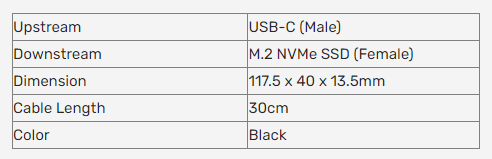
Specification: